Alloy release round-up: September 2026
Oct 1, 2026
Featuring conversational AI for your analysts and your support experience, plus session-level risk scoring for risk-based authentication
This month, Alloy’s Actionable AI got conversational. Analysts can now chat with AI Analysis instead of reading a one-shot summary, and every client gets 24/7 answers from AskAlloy, our new AI support agent. We also put self-serve “data routing” in every client's hands, shipped Session Risk Scores for risk-based authentication, brought workflow undo/redo to all customers, and opened up a new Diagnostics API for latency. Here's the rundown.
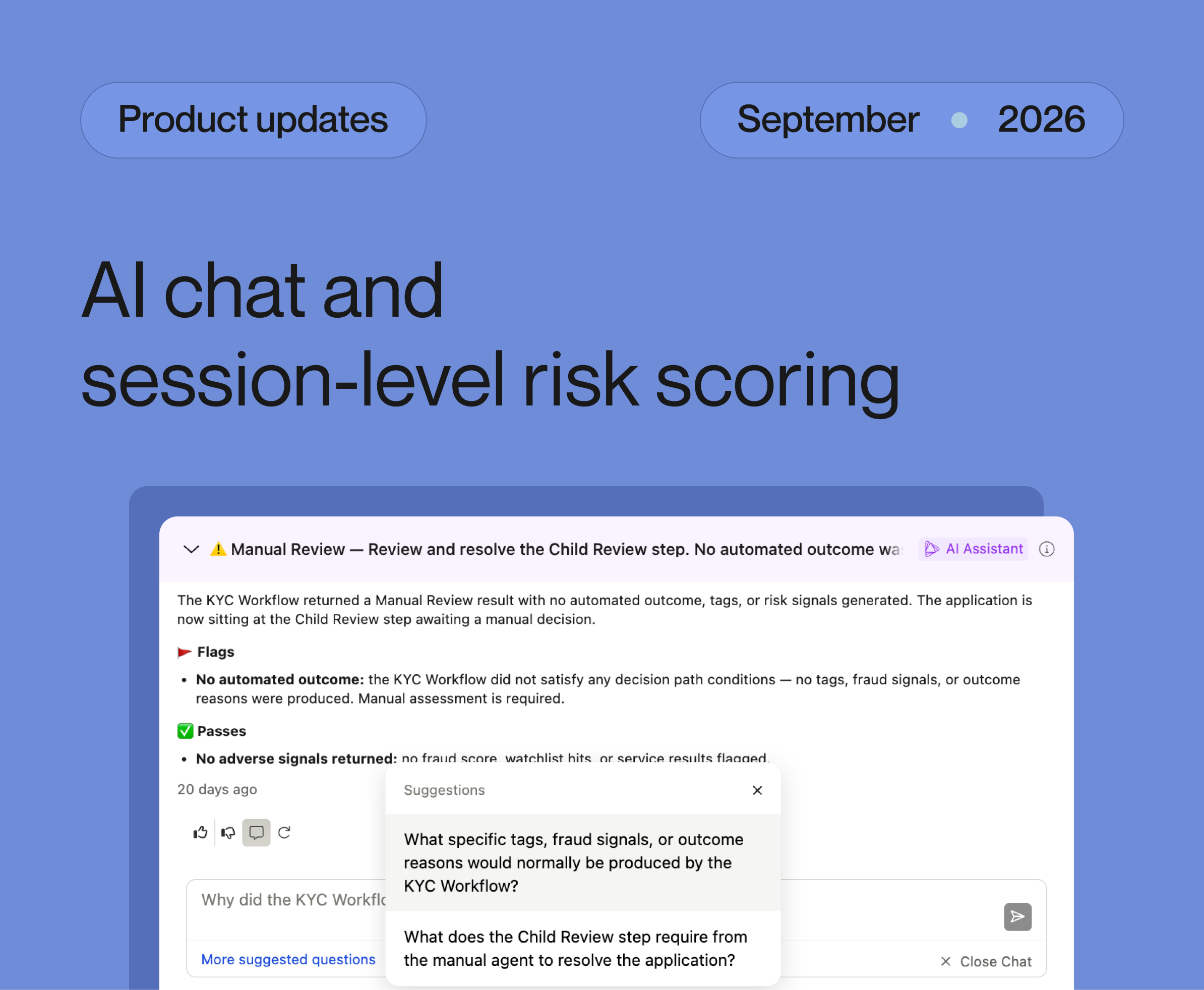
Chat with AI Analysis to answer all your data questions
Until now, AI Analysis gave analysts a comprehensive but static summary of a record. This month, we turned AI Analysis into an interactive assistant with a new chat feature. Analysts can ask follow-up questions in natural language and get answers grounded in the same record data the summary was written from.

The chat feature lets an analyst dig into the exact parts that matter to their review, ask clarifying or ‘explain this’ questions, and keep going until they have what they need.
- Grounded, auditable, and truthful. Answers are grounded in the record's data and cite what they relied on. If the data doesn't cover the question, it says so (and specifies what's needed) rather than extrapolating to fill the gap. Compliance teams rejoice!
- Available across every record type. Journey Applications, Evaluations, Investigations, and Alerts.
- Easy to start. Each AI Analysis comes with two to three pre-generated questions you can select from to kick off the conversation.
- Private, persistent history. Each analyst has their own conversation history that persists across sessions, so they can pick a review back up later.
- Guardrails on every message. Catching unsafe inputs and outputs before they cause harm.
The analyst still makes the final decision, but puts Alloy to work to make that decision more informed. The interactive chat feature is now live for all AI Analysis customers.
Significantly upgraded data routing: route any data to any service, self-serve
Configuring how dynamic data flows from the output of one service into the input of another (what we’ve always called “data routing”) just got a whole lot easier. With our new self-serve and flexible data routing, you can route any attribute to any service's payload field in a few clicks, right in the workflow editor.
Click any service in your workflow and add a data route: pick the from (the output attribute you want to route in) and the to (the input payload field you want to route to). Need a field that isn't in the schema yet? You can type it in yourself, so updating your policy never stalls while you wait for us to update something for you.
Already have data routes configured? No worries! We've backfilled existing clients onto the new version seamlessly under the hood, with a warning system in place to confirm the new routing matches your legacy setup before cutover.

AskAlloy: 24/7 AI-powered support
Your support experience just got a big boost. AskAlloy is a new AI agent that gives clients instant, 24/7 answers. Our amazing technical support team is still a click away; we’re just adding a new instant first response to complement them.

- Available wherever you already work. Chat with AskAlloy from the Support widget in the dashboard, over email at [email protected], and in your Alloy Slack channels. It resolves common questions instantly from our knowledge base and API docs, and hands off to our human Technical Support team whenever that's the right move.
- A brand-new help center. help.alloy.com has been rebuilt, with a client support portal where you can see the tickets you've submitted.
- Freshly rewritten documentation. We took the opportunity to overhaul our client-facing docs (roughly 60 new articles!) so the answers you get are accurate and up to date.
This is the first step in a longer journey: we'll keep making AskAlloy smarter and more context-aware in the months ahead, so it answers more of your questions faster and frees our team to go deeper on the things that need a human.
Session Risk Scores for risk-based authentication
Following July's login aggregations, we're continuing to build on top of our market-leading risk-based authentication (RBA) solution. Clients can now ingest, store, and decision on session-level risk scores from the fraud vendors they already use, directly inside Alloy, all self-serve.
Pass a risk score from any vendor into Alloy alongside an event, and Alloy stores it as a session-scoped published attribute you can use in workflow rules. Unlike entity-level attributes, a session risk score is scoped to a single session (like a login flow or a series of related transactions) and stays available on every subsequent event in that session, so you can update it as new signals arrive.

- Decision on it in your rules: e.g. "if session risk score > 80, step up to MFA" or "if session risk score is high, deny the transaction."
- Configure ranges (low/medium/high) with custom labels and colors, just like entity-level risk attributes.
- See it in review: a dedicated Session Risk tab on evaluation review screens, across entity events, logins, transactions, and investigations.
- Tie scores to a session by passing an external_session_id (yours) or the Alloy-generated session_token returned in the POST /events response.
To set one up: Settings → Published Attributes → Add Published Attribute, set Object Type to Session and Category to Session Risk Scoring, then reference it in a workflow node.
Also shipped in September 2026
Decisioning & visibility
- Error Attributes. A long-requested set of global attributes representing the most common reasons a service fails (like authentication error, service timeout, rate limit exceeded, and more) that you can add to workflows and use for decisioning. The dashboard now also shows *why* a service failed when you look at an evaluation. And you can define your own service-specific error attributes for fields a vendor returns in its raw response. Now available to all clients.
Workflow editor
- Undo/redo. You can now step back and forth through your sequential edits to an open workflow, with the affected change focused and highlighted so you can see exactly what moved. Use the header arrows or cmd+z / cmd+shift+z.

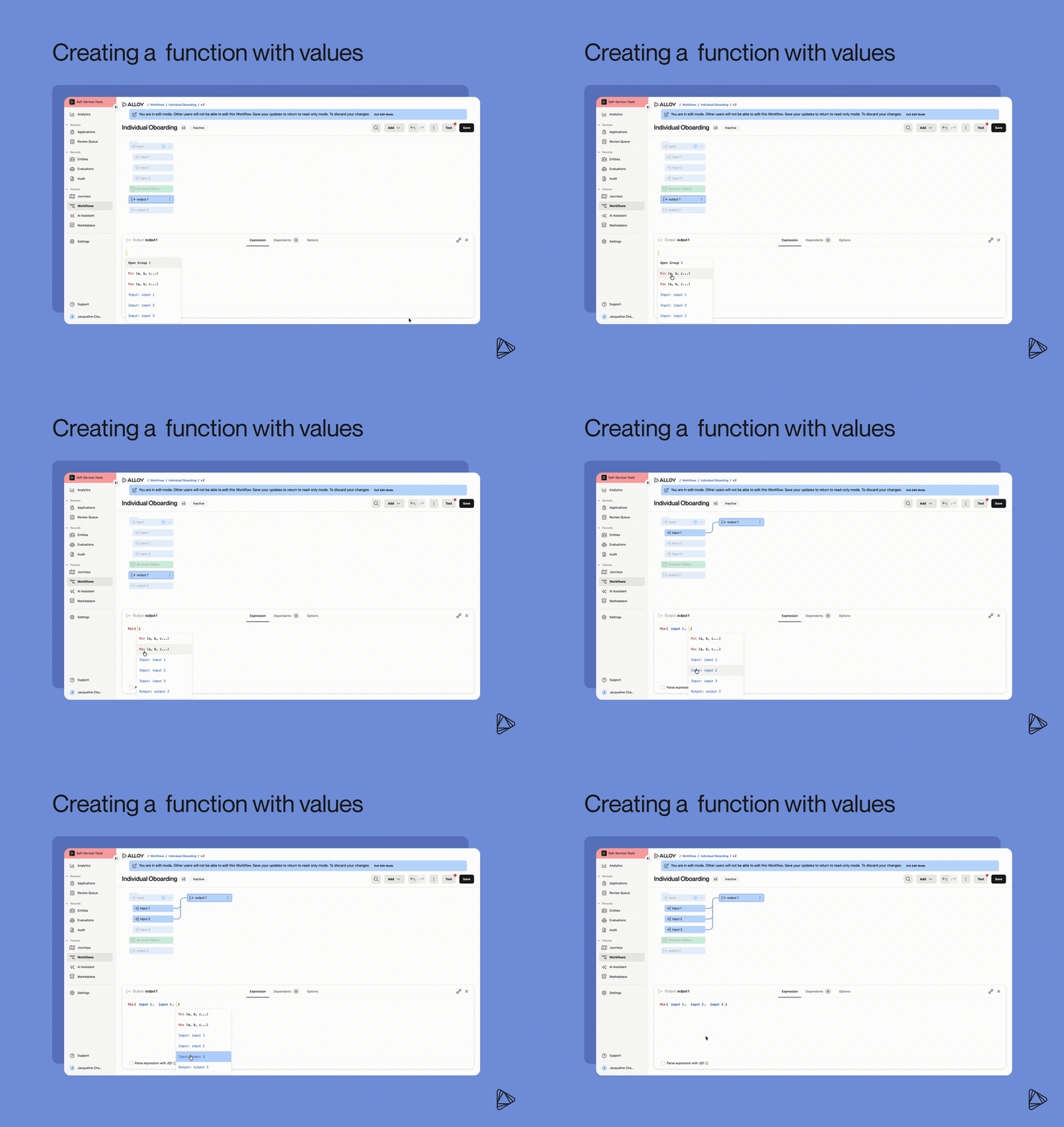
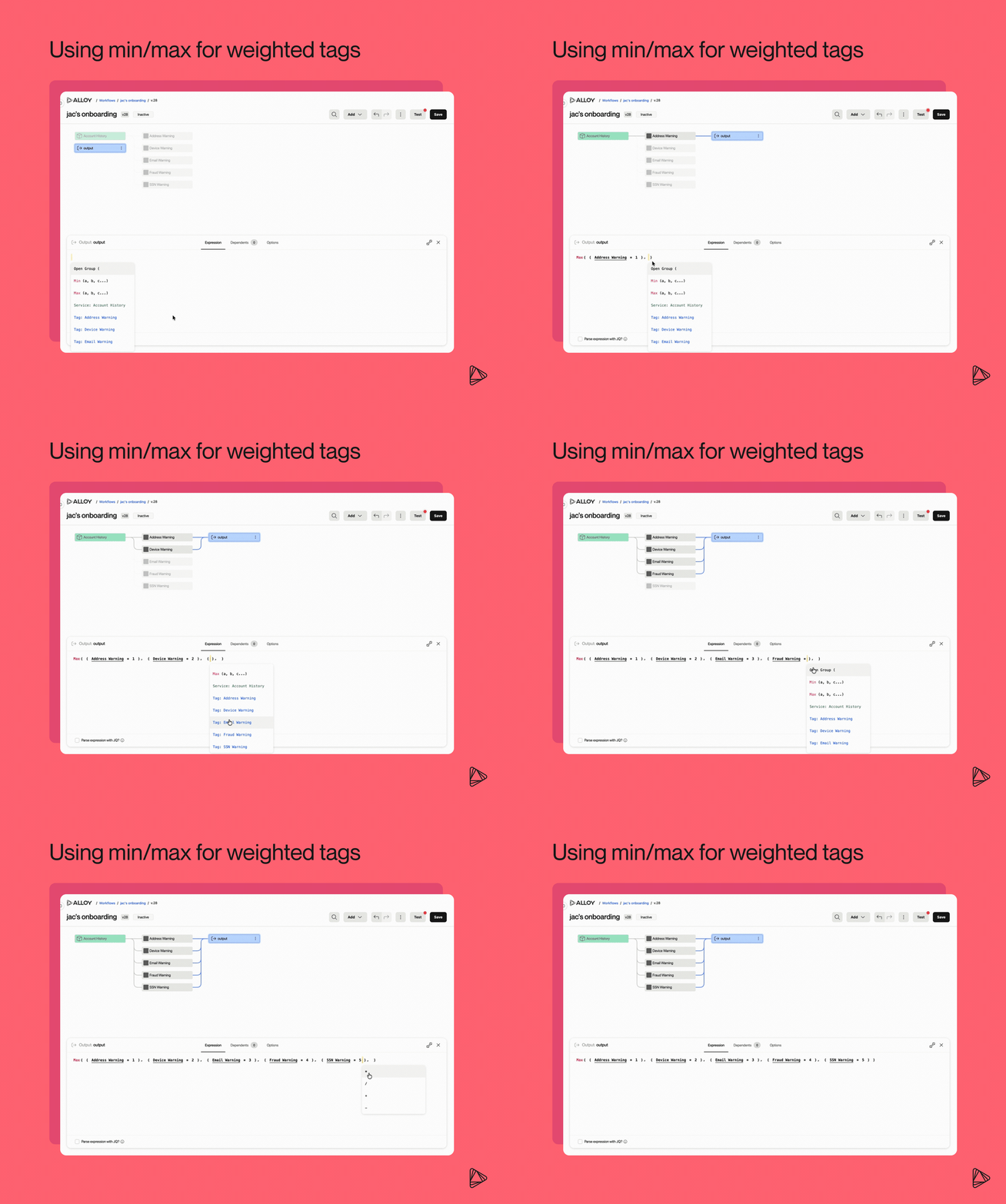
- Min/max operators for Output Attributes. You can now add min ( ) or max ( ) functions directly in your Output Attribute expressions. Any time you need to cap a value, set a floor, calculate weighted tags, or compare risk scores across data sources, min() and max() operators are available to help.
- Clearer workflow types. Creating a workflow now starts with a canonical use case, designed to make your setup faster and less ambiguous. Workflows can be described by what they are evaluating, which entity scope and runtime they support, and which evaluation types and events are eligible. The new taxonomy includes use cases like Account Opening, Credit Underwriting, Transaction Monitoring, Ongoing Event Monitoring, Third Party Monitoring, and more.
Developer & platform
- Diagnostics API (Journey Application Timings). A new public endpoint returns a full latency breakdown for a Journey Application, such as top-level duration, the ordered event timeline across its lifecycle, and per-evaluation, per-service timing down to individual outbound API call durations. Built for SLA reporting, latency troubleshooting, and validating the impact of config changes; uses the same Basic auth as our other public endpoints.
- Entity PII Updates History (new dashboard experience only). The Entity panel now shows a full PII update history, such as name, SSN, license/passport, birthdate, addresses, phones, emails, and more, for both Person and Business entities. Each update comes with a reference token tracing back to its source, a full timestamp, and clean grouping by type.
See more product updates

Charles Hearn is Alloy's CTO. Previously, Charles was a Project Manager at Microsoft and the lead developer at a high-risk payment processing company.