Alloy release round-up: August 2026
Sep 3, 2026
Featuring the Alloy Marketplace, self-service attribute management and a new application review experience.
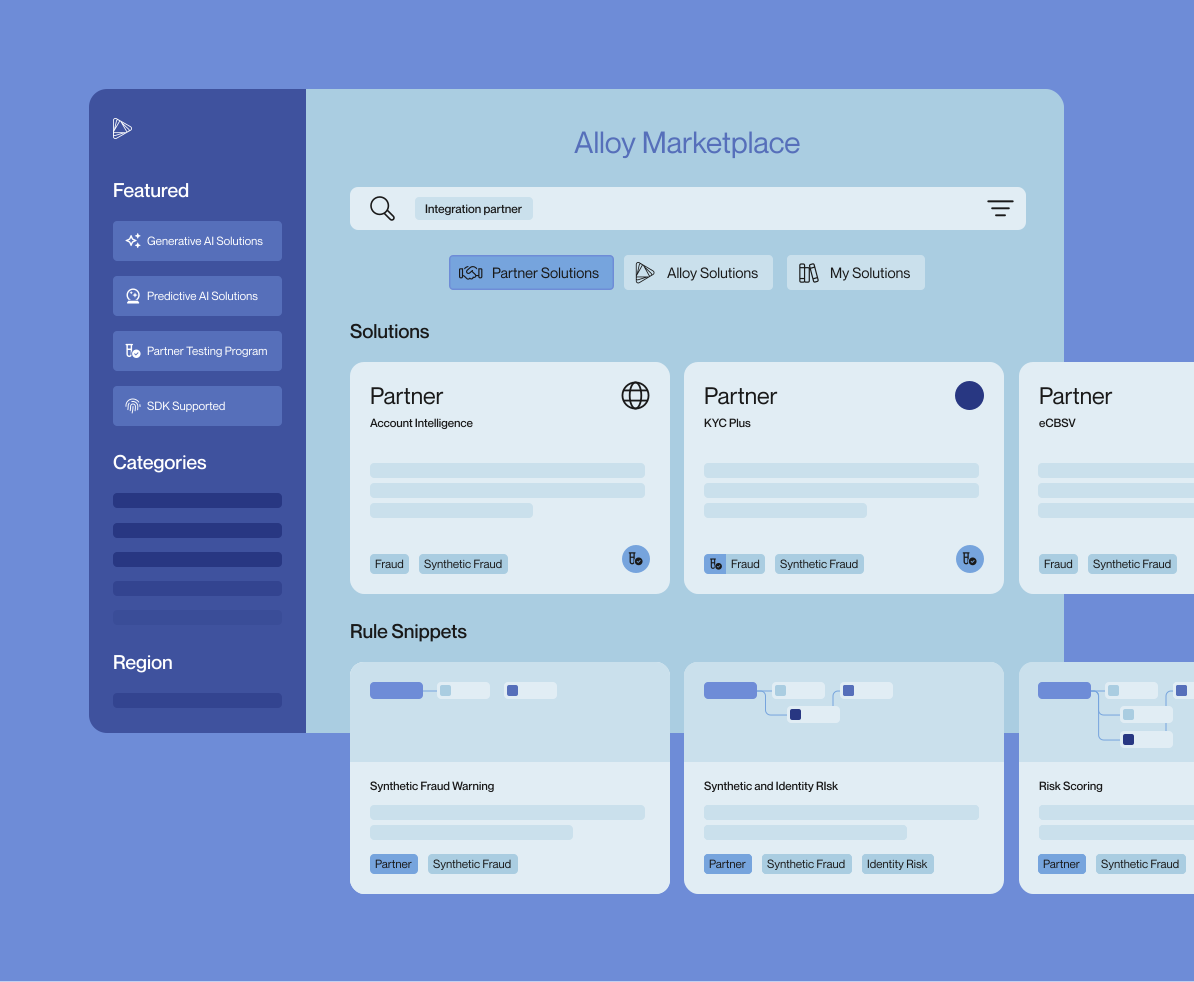
The Alloy Marketplace is live! The Partner Center and our Policy Library previously lived as two totally separate experiences. This month, we merged them into one home, and published a big batch of new Alloy-curated policy snippets.
Looking back at everything else we shipped in August, there's a pretty clear theme: a lot of work that used to require a ticket, a migration, or a Slack message to someone on our team is now something you can just go do yourself. Within the new Marketplace, the Attribute Tool is now generally available. Plus smarter rule-based notifications and some queue hygiene we're not sorry about!
The Alloy Marketplace
The Partner Center is now the Alloy Marketplace: a single hub where you can discover, test, and deploy the building blocks of your risk workflows, including partner integrations, attributes (more below), and pre-built workflow snippets from our Policy Library.

Here's the problem we were solving. Partner integrations and reusable rule logic lived in two different places, so if you were evaluating a new data vendor, you'd find it in one experience, and then go figure out how to actually write policy against it somewhere else, usually starting from a blank page. Those two things belong together, and now they are.
The Policy Library is the piece I'm most excited about. It's a curated collection of pre-built policy "snippets," modular decisioning logic drawn from Alloy’s proven client use cases and vendor best practices. So instead of building a velocity rule or a document-verification branch from zero, you can grab a snippet that already reflects how other teams solve that problem and adapt it to your policy. Teams can also create and save their own snippets to an account-specific library of reusable logic to standardize best practices, reuse them across different regions or lines of business, and iterate faster as requirements evolve.
Highlights:
- 270+ partner integrations, now sitting alongside a growing library of policy snippets. Evaluating a vendor and writing the logic are no longer two separate projects.
- Proven decisioning logic you can deploy instead of writing from scratch. This meaningfully shortens the trip from "we signed this vendor" to "this vendor is affecting decisions in production."
- A guided merge flow with built-in conflict detection. My favorite part! Pulling a snippet into an existing workflow is safe even if you're not the most technical person on your team, which means contributing policy isn't gated on engineering anymore.
The Marketplace is live for all clients right now. There's a deeper dive on the launch here.
The Attribute Tool is generally available
Attributes are what turn a raw partner API response into a value your workflows can actually reason about. Historically, if you needed a new one or needed an existing one tweaked, you filed a request and waited on us.
Not anymore! The Attribute Tool is GA and lives in all client accounts. It covers the whole lifecycle, including browsing, creating, testing, and modifying attributes yourself.

- Explore every attribute in an integration. Both Alloy-owned and your own custom ones, with filtering by which attributes are actually in use in an active workflow. Don't sleep on that last filter, as it tells you what's load-bearing before you touch anything.
- Build custom attributes with guardrails. Load a sample API response, test your JSON selector against it, and hit "Validate Attribute" before you save. You find out whether your selector works while you're building it, not after a live evaluation returns something weird.
- Duplicate Alloy attributes to customize a copy. Alloy-owned attributes stay read-only for clients, so you can adapt our logic without any risk of editing something other workflows depend on.
- Transform complex data with JQ (arrays, nested fields, conditionals) with uniqueness validation and account-slug prefixing so custom values can't overwrite each other.
- Track every change in a per-integration changelog, with field-by-field before and after values. Great for debugging, and great for when someone asks who changed what and when.
Admin roles get view, create, and edit access by default, and you can manage those permissions per role under Settings → Roles. Full details live in the Attribute Tool docs.
The new Application Review Experience
We rebuilt the application review interface from the ground up, and as of the end of August, it's open to any client who wants it. The goal was to make review faster and cleaner, and to shape it around how review teams actually work rather than how the old screen happened to be organized.

It's opt-in only, and you can switch back at any time. We will continue to keep iterating on real feedback, so if you try it and something is missing, we want to hear it.
Help documentation for the Application Review experience.
Also shipped in August 2026
Platform & product
- A new workflow taxonomy. Workflows are moving off the previous person, business, and ongoing types and into more intuitive use-case-based ones such as Account Opening, Credit Underwriting, Transaction Monitoring, Ongoing Event Monitoring, Third Party Monitoring, Router, and Group Assessment, with entity and portfolio variants where they apply. Now a workflow tells you what it evaluates, what scope and runtime, and which evaluation types and events it's eligible for. You'll see clearer labels, icons, and grouping across the dashboard and the Journey Editor, plus better guardrails in Events Settings so a workflow can only be mapped to events it can actually handle. Eligibility for evaluation types, the SDK, backtesting, and Fraud Attack Radar is taxonomy-aware too.
- Rule-based notification validation and drift detection. When you create or edit a rule-based notification policy, we now check that the outcome, response status, or tag that you're referencing actually exists in the active version of your workflow or journey. Invalid rules get rejected at save time with a clear error, instead of silently never firing. And because workflows change after the fact, the rule list now flags rules that have gone invalid, so there are no mystery dead rules sitting in your list. You can also now sort rules by name or by workflow/journey.
- Default expiration on step-up and end user action nodes. Both node types now get a 14-day expiration window by default on newly created nodes. You can edit the value, but you can't remove the expiration entirely. Expiration is still optional on review, service, and event action nodes, and end user action node expiration is now granular down to the minute instead of just days. One tip: if you've got existing step-up or action nodes without expirations, it's worth going back and adding them, since this default only applies to new nodes.
See more product updates

Charles Hearn is Alloy's CTO. Previously, Charles was a Project Manager at Microsoft and the lead developer at a high-risk payment processing company.