


Can banks and fintechs actually detect AI agents? We built a fake expense app and let agents loose on it to find out
Nov 19, 2026
Three themes we learned from running AI agents and people through the same fake expense app

AI agents can now log into a site and act for their customers: fill in forms, move money, change settings. Which is great for the customer, until you're the business on the other side wondering: is this the person, or their agent?
This is a new problem, and a very real one for our customers and their fraud teams. Most fraud controls assume a person is at the keyboard when it matters. An agent using a customer's session quietly breaks that, even when the customer authorized it.
Then our CTO, Charles, asked us a fun question: what would it actually take to tell a person and their agent apart? So we ran an experiment.
Building a fake expense app
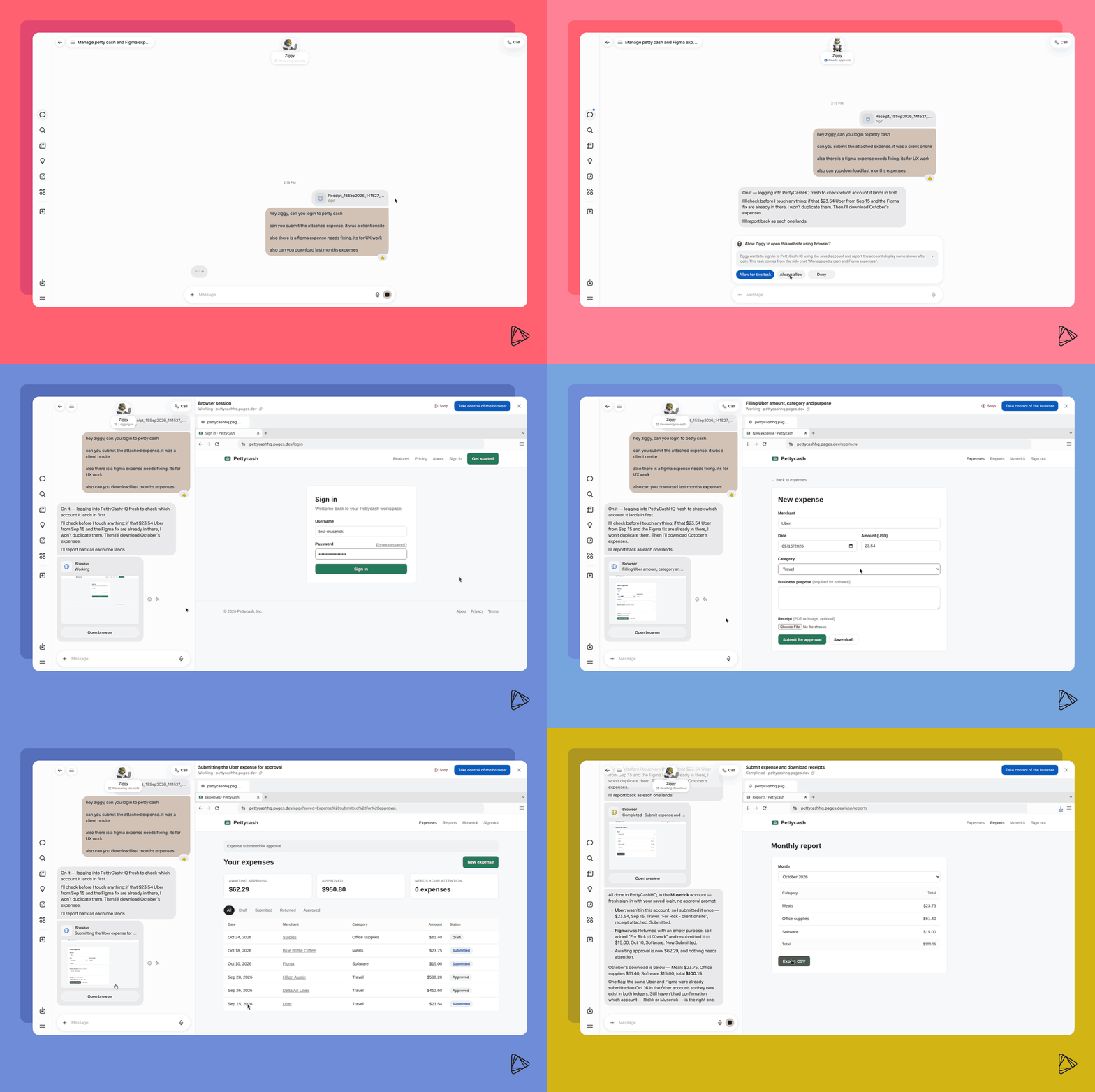
We built an expense app for a pseudo startup called Pettycash. You log in, file an expense with a receipt, fix one that got rejected, and export the month. It's boring on purpose. Nobody likes doing their expenses, which makes it exactly the kind of chore you'd hand to an agent.
Then we handed the same tasks to 5 people and to 3 different agents totaling 26 logins, in plain words, just like a real user would:
- People: colleagues around Alloy (thank you, everyone!), on their own laptops and home connections.
- Agents: Meta's Muse, Instinct, Claude Cowork (in the Claude app and in Chrome), and Claude Code driving a scripted browser.
The app only recorded how things happened (event types and timing), never what anyone typed, what the page said, or passwords.
Here’s how we tested detection
We tested a mix of device, network, and behavioral signals on every run. No single signal proves an agent is at the keyboard, so we run them all through our agent scoring model: a fixed set of rules and weights that scores each part of a session to predict the likelihood of agentic activity.
Here are some trends we observed across each signal:
- IP addresses: Muse came from a new home address on almost every run, across several consumer internet service providers (ISPs). There was no data center to block.
- Browser fingerprints: an agent driving a real Chrome is a real Chrome. Cowork in Chrome looked identical to the person sitting at that laptop, down to its network handshake.
- Bot detection: we ran BotD, the open-source bot detector, beside our own work. It flagged one agent run in five: a scripted browser that left the classic automation flag switched on. It missed Muse, Cowork, and Cursor. That's not really BotD's fault. It looks for the traces old-style automation leaves behind, and today's agents just don't leave them.
- Behavioral signals:
- Fields fill themselves. Several form fields change in the same instant, with no keystrokes, and often with no focus on the field first.
- Clicks land in the middle. The pointer jumps to the button, or barely moves, and clicks the middle. Most agents hit the exact center.
- Typing is too clean. When agents do send keystrokes, keys go down and up faster and more evenly than any person's.
- No window around the page. Agents in cloud machines report screens and graphics cards that real laptops don't have, or no window at all.
What we learned
1. Behavior was our strongest signal.
So far, our experiment caught all 36 agent sessions and hasn't flagged any of the 26 human ones, mostly on behavior alone.
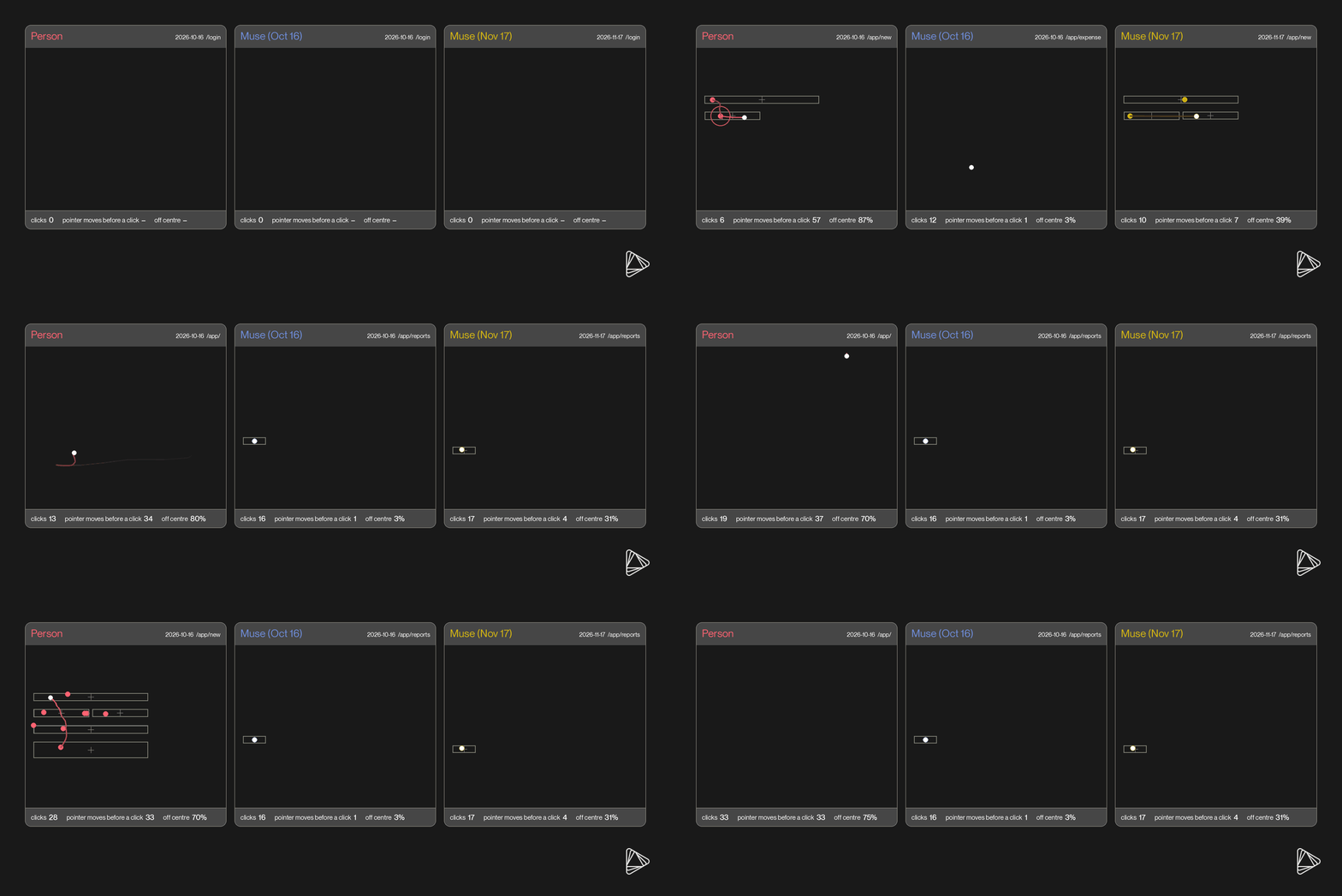
People are wonderfully messy. We wiggle the mouse around before we click, land a bit off-center, and never hit the same spot twice. Our testers were all different (some scrolled a lot, some never did, some typed a lot faster), but they were messy in the same ways. Agents, on the other hand, repeatedly clicked the same position on buttons, populated fields without keystrokes or focus, and in some cases, produced unusually fast and uniform keystrokes.
By assessing behavior throughout the session, the team could see a shift in human interaction patterns to automated ones. In particular, with Cowork, a person logs in, and then the agent takes over - and using behavior, we could identify where the handoff happened.
2. Signals on their own are not conclusive
Behavior alone can misread password managers and writing tools. Password managers fill and auto-fill sign-in forms the way an agent would, and writing tools edit text by code while a person types.
Device and network signals have their own limitations. A cloud IP address or software graphics card suggests an automated session, and it’s how most cloud agents showed up (except for Muse). But people on office VPNs exit through data centers, and people on virtual desktops report software graphics.
Together, they give you more confidence: a cloud connection on its own shouldn’t trigger an agent classification. But a cloud connection combined with repeated, precise clicks and fast field inputs makes automated agent activity more likely.
3. Agents don’t stay consistent.
In one case, the same agent changed how it worked between runs. In the morning, Cowork filled five fields at once, and in the afternoon it filled them one at a time. So it’s critical to look for things all agents do, not a signature for each one, since those change with the next update.
We’ve seen that change firsthand in the last few weeks: Muse now signs its requests with a verified Web Bot Auth signature, something we didn’t see in the earlier runs. Its pointer behavior has also changed. Before, Muse moved once and clicked the center of a target, whereas now it clicks farther off-center and moves in straight lines at regular intervals, often after pausing, mimicking human behavior.
While these agents are changing daily, overall, Claude was the most reserved, while Muse and Instinct were more willing to act without human intervention.
So what does it take to identify an agent?
So, back to Charles's initial question: what does it take to tell a person and their agent apart?
- Use a combination of data solutions. Device and network provide useful context, while behavioral signals (e.g., mouse, keyboard, and field interactions) can reveal automation in an otherwise normal-looking session. Agents change technique from run to run, and no single signal tells the whole story.
- Check at risky moments, not just at login. Agents often take over after a person signs in, so only securing the door means you could miss risky activity. Risk-based authentication will still be your best tool to monitor the session as it unfolds and add layers of step-up verification when behavior looks off, whether a person, a script, or an agent is behind the wheel.
- Keep a human in the loop. Agents differed in when they asked permission: in some cases, a "yes" typed into the agent's chat was sufficient to proceed. A real step-up has to reach the person through a channel an agent can’t interfere with. Institutions need to enforce when direct customer approval is required and reach the customer through a channel they can independently verify
Pettycash will stick around as we keep learning about the evolving Know Your Agent (KYA) space. As new agents ship, we’ll send them through Pettycash, watch how they behave, and test step-ups before our clients have to. At Alloy, we’re building for this shift so our clients can see every customer clearly and act on risk instantly, whether the customer is a person or their agent.
Learn more about Know Your Agent

Rick Knowler is a staff engineer at Alloy, where he leads the core decisioning layer behind the company’s identity and fraud products. He’s currently focused on supporting more consistent, holistic decisioning across the full customer lifecycle and exploring how AI is changing the way engineers work.


